ℹ️ Candelair is no longer developed or supported.
Candelair
The alternative Apple® IR Receiver driver and emulator.
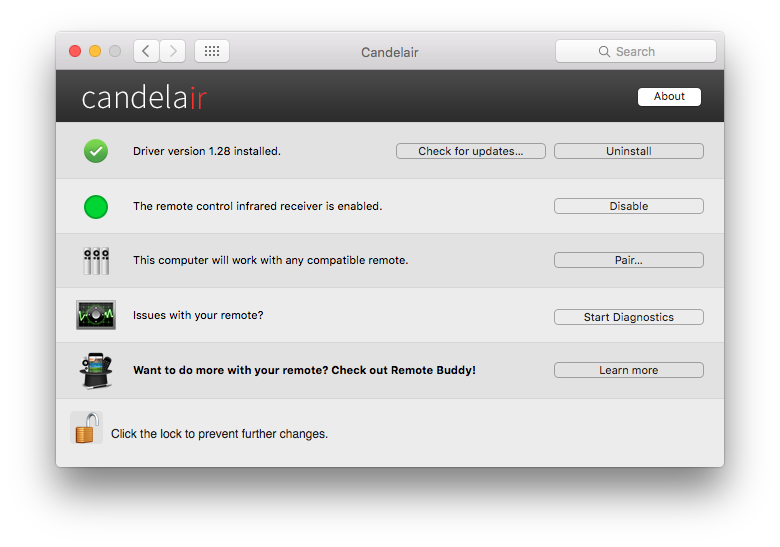
Candelair includes an alternative driver for built-in Apple IR Receivers. Where the original driver falls short, Candelair shines: improved reliability with third-party apps, better responsiveness, always-available pairing and a clean, direct access API for applications like Remote Buddy.
Candelair is capable of emulating an Apple Remote on every Mac - even those without a built-in IR Receiver. Candelair can synthesize remote control events that are identical to those of a real Apple Remote, providing access to the otherwise inaccessible, built-in remote control support in many apps. Apps like Remote Buddy use this feature to make other remotes look like an Apple Remote to apps and the system.
Important options for built-in Apple IR Receivers are burried in the advanced settings of the System Preferences Security settings – and their meaning not always easily comprehensible. Candelair finally gives these options the place they deserve: their own System Preferences pane, complete with text and images illustrating their meaning.
The reasons for an Apple Remote not working can be manifold - and trying to find the reason an unrewarding, lengthy procedure. The Remote Control Diagnostics tool included with Candelair makes this task significantly easier by performing automated checks and providing an actionable diagnostic report of its findings.
The easiest way to uninstall Candelair is by clicking the Uninstall button in the Candelair preference pane (in System Preferences). The Candelair preference pane itself can subsequently be removed by right-clicking on the Candelair icon in System Preferences and selecting Remove from the context menu.
If you can't or don't want to use the Candelair preferences pane, you can also remove Candelair's resources manually:
/Library/LaunchAgents/com.iospirit.candelair.agent.plist /Library/LaunchDaemons/com.iospirit.candelair.sync.plist /Library/LaunchDaemons/com.iospirit.candelair.daemon.plist /Library/LaunchDaemons/com.iospirit.candelair.loadiremulation.plist /Library/StartupItems/CandelairPrefsTool /Library/Candelair/ /Library/PreferencePanes/Candelair.prefPane ~/Library/PreferencePanes/Candelair.prefPane /Library/Extensions/RBIOKitHelper.kext /System/Library/Extensions/RBIOKitHelper.kext
ℹ️ Depending on the installed Candelair and macOS versions, not all of these resources may be present.

Requires macOS 10.6 or later. macOS Sierra recommended.